Acroform PDF ドキュメントで iTextSharp を使用して複数選択リスト ボックスを生成または再生成すると、Adobe Reader DC で望ましくない結果が得られます。
問題: Adobe Reader DC で変更された PDF を表示すると、リスト ボックスの先頭にある選択されていない表示項目が PDF フォームに表示されません。例: 「One」、「Two」、「Three」、「Four」、「Five」はリスト項目です。「2」と「4」が選択されています。次に、「One」などの前の項目がリスト ボックスの上部に表示されません。そして、リスト ボックスに表示される最初の項目は、最初の選択 (この場合は「2」) から始まります。(Adobe Reader DC のスクリーンショットを参照)
参考: Adobe Reader DC を使用して、リスト ボックスで別のフィールドを選択してからリスト ボックスの外側をクリックすると、リスト ボックス フィールドが通常の外観に戻り、すべての項目が表示されます。Adobe Acrobat Professional 8 で変更された PDF を開くと、この動作を再現できず、すべてのフィールド項目が表示され、正しく選択されます。PDF を BMP または PNG に変換する際に、GhostScript でリスト項目が欠落しているこの動作を再現することもできます。
私の質問に答えてください: これが iTextSharp の問題であるか、構文が正しくない場合、この問題の解決策を教えてください。Adobe Reader DC を使用してこの動作を再現できるかどうかも教えてください。
ご支援いただきありがとうございます!
問題のある変更された Acroform PDF ドキュメント: http://www.nk-inc.com/listbox-error.pdf
Adobe Reader DC スクリーンショット:
(出典: nk-inc.com )
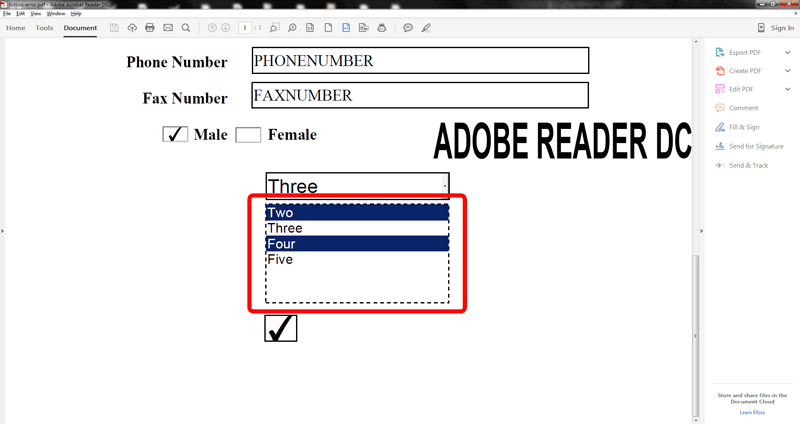
ADDITIONAL INFORMATION:
iTextSharp.dll Version: 5.5.6.0
Adobe Reader DC Version: 2015.008.20082
Adobe Acrobat Pro Version: 8.x
Form Type: Acroform PDF
VB.NET コード (v3.5 – Windows アプリケーション):
Imports iTextSharp.text.pdf
Imports iTextSharp.text
Imports System.IO
Public Class listboxTest
    Private Sub RunTest()
        Dim cList As New listboxTest()
        Dim fn As String = Application.StartupPath.ToString.TrimEnd("\") & "\listbox-error.pdf"
        Dim b() As Byte = cList.addListBox(System.IO.File.ReadAllBytes(fn), New iTextSharp.text.Rectangle(231.67, 108.0, 395.67, 197.0), "ListBox1", "ListBox1", 1)
        File.WriteAllBytes(fn, b)
        Process.Start(fn)
    End Sub
    Public Function addListBox(ByVal pdfBytes() As Byte, ByVal newRect As Rectangle, ByVal newFldName As String, ByVal oldfldname As String, ByVal pg As Integer) As Byte()
        Dim pdfReaderDoc As New PdfReader(pdfBytes)
        Dim m As New System.IO.MemoryStream
        Dim b() As Byte = Nothing
        Try
            With New PdfStamper(pdfReaderDoc, m)
                Dim txtField As iTextSharp.text.pdf.TextField
                txtField = New iTextSharp.text.pdf.TextField(.Writer, newRect, newFldName)
                txtField.TextColor = BaseColor.BLACK
                txtField.BackgroundColor = BaseColor.WHITE
                txtField.BorderColor = BaseColor.BLACK
                txtField.FieldName = newFldName 'ListBox1
                txtField.Alignment = 0 'LEFT
                txtField.BorderStyle = 0 'SOLID
                txtField.BorderWidth = 1.0F 'THIN
                txtField.Visibility = TextField.VISIBLE
                txtField.Rotation = 0 'None
                txtField.Box = newRect '231.67, 108.0, 395.67, 197.0
                Dim opt As New PdfArray
                Dim ListBox_ItemDisplay As New List(Of String)
                ListBox_ItemDisplay.Add("One")
                ListBox_ItemDisplay.Add("Two")
                ListBox_ItemDisplay.Add("Three")
                ListBox_ItemDisplay.Add("Four")
                ListBox_ItemDisplay.Add("Five")
                Dim ListBox_ItemValue As New List(Of String)
                ListBox_ItemValue.Add("1X")
                ListBox_ItemValue.Add("2X")
                ListBox_ItemValue.Add("3X")
                ListBox_ItemValue.Add("4X")
                ListBox_ItemValue.Add("5X")
                txtField.Options += iTextSharp.text.pdf.TextField.MULTISELECT
                Dim selIndex As New List(Of Integer)
                Dim selValues As New List(Of String)
                selIndex.Add(CInt(1)) ' SELECT #1 (index)
                selIndex.Add(CInt(3)) ' SELECT #3 (index)
                txtField.Choices = ListBox_ItemDisplay.ToArray
                txtField.ChoiceExports = ListBox_ItemValue.ToArray
                txtField.ChoiceSelections = selIndex
                Dim listField As PdfFormField = txtField.GetListField
                If Not String.IsNullOrEmpty(oldfldname & "") Then
                    .AcroFields.RemoveField(oldfldname, pg)
                End If
                .AddAnnotation(listField, pg)
                .Writer.CloseStream = False
                .Close()
                If m.CanSeek Then
                    m.Position = 0
                End If
                b = m.ToArray
                m.Close()
                m.Dispose()
                pdfReaderDoc.Close()
            End With
            Return b.ToArray
        Catch ex As Exception
            Err.Clear()
        Finally
            b = Nothing
        End Try
        Return Nothing
    End Function
End Class